Signal Preprocessing
Preprocessing reduces noise and removes artifacts before event detection.
ionique provides three tools: Filter for frequency-domain filtering,
ClockFilter for removing instrument clock tones, and Trimmer for
discarding edge transients at voltage-step boundaries.
Filtering with Filter
Filter wraps scipy’s Butterworth and Bessel IIR filters with a simple
callable interface. It modifies the current array in place.
from ionique.utils import Filter

filt = Filter(
    cutoff_frequency=5000,       # Hz
    filter_type="lowpass",
    filter_method="butter",      # or "bessel"
    order=2,
    bidirectional=True,          # zero-phase (sosfiltfilt)
    sampling_frequency=100000,
)
# filt is now a callable that will modify a current array in place
filt(trace.current)
Filter types:
"lowpass"— removes high-frequency noise above the cutoff."highpass"— removes low-frequency drift below the cutoff."bandpass"— keeps frequencies between two cutoffs (pass a list:cutoff_frequency=[100, 5000])."bandstop"— removes a frequency band (e.g. 50/60 Hz line noise).
Filter methods:
"butter"(default) — Butterworth, flat passband response."bessel"— preserves waveform shape, better group delay.
Filter order:
Specifies the order of the filter, i.e. how aggressively frequencies are filtered beyond the cutoff range.
A high order (e.g. order=16) "bessel" filter approximates a gaussian blur.
Unidirectional vs. Bidirectional filtering
When bidirectional=True (default), the filter is applied forward and
backward (scipy.signal.sosfiltfilt), eliminating phase distortion.
Set bidirectional=False to use causal filtering (sosfilt). Note that bidirectional doubles the filter order.
Choosing a cutoff frequency
The cutoff controls how much noise you remove versus how much signal detail you preserve. Lower cutoffs produce smoother traces but may blur fast events and details.
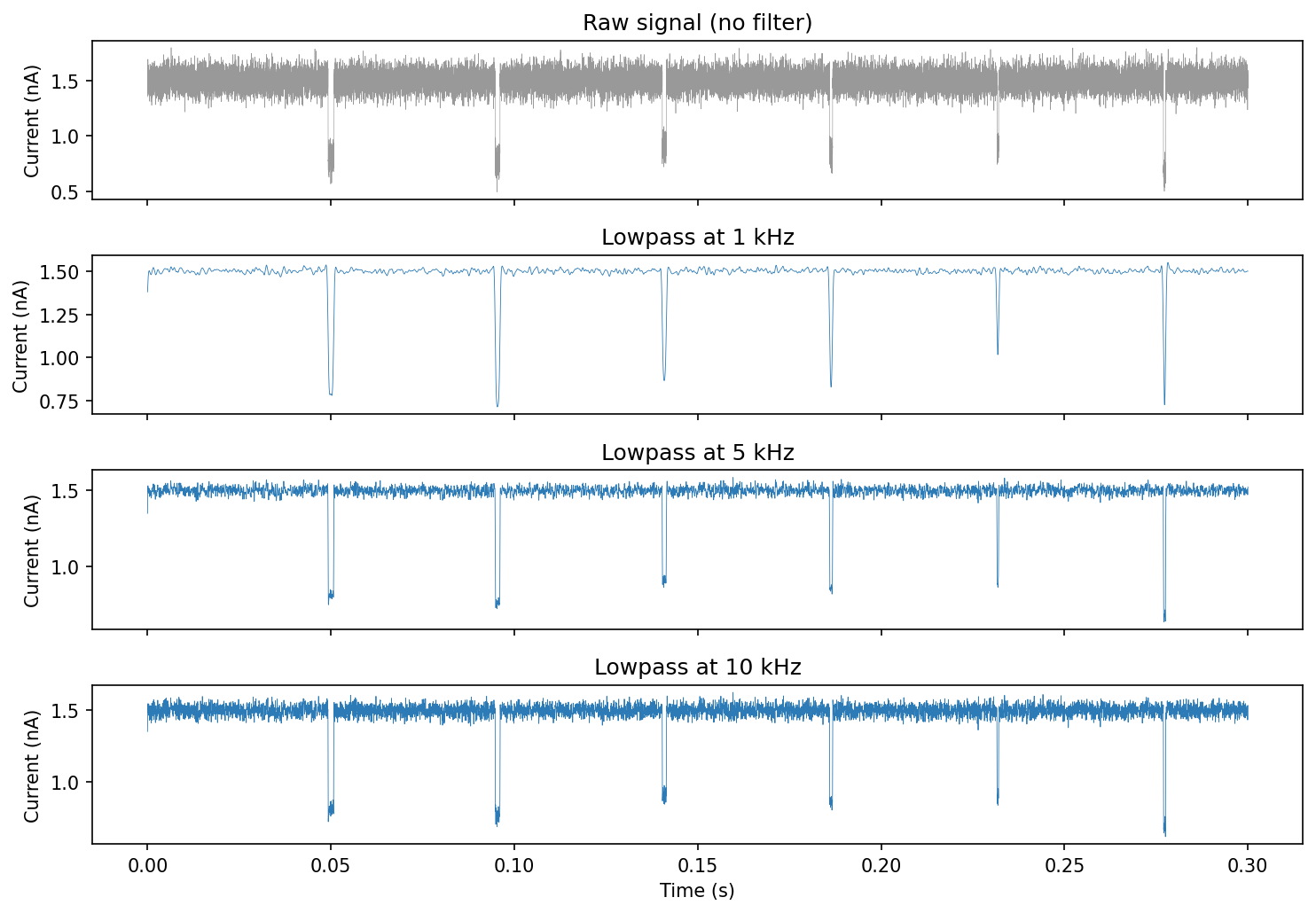
The figure shows the same noisy spike signal filtered at three cutoffs:
for cutoff in [1000, 5000, 10000]:
    filt = Filter(
        cutoff_frequency=cutoff,
        filter_type="lowpass",
        sampling_frequency=100000,
    )
    filtered = trace.current.copy()
    filt(filtered)
1 kHz — very smooth, but fast transients are attenuated.
5 kHz — good balance for most nanopore experiments.
10 kHz — preserves fast events but retains more noise.
Tip
A common starting point is cutoff_frequency = sampling_freq / 20
(e.g. 5 kHz for a 100 kHz recording).
Clock-tone removal with ClockFilter
Some instruments inject a periodic clock signal into the current trace.
ClockFilter estimates and subtracts this tone by fitting a sine wave at
the clock frequency within sliding windows.
from ionique.utils import ClockFilter

clock = ClockFilter(
    clock_frequency=1000,       # Hz — the clock tone frequency
    section_length=0.5,         # seconds — window for sine fitting
    sampling_frequency=100000,
)
clock(trace.current)
ClockFilter modifies the array in place, just like Filter.
Parameters:
Parameter |
Default |
Description |
|---|---|---|
|
(required) |
Frequency of the clock tone to remove (Hz). |
|
|
Length of each fitting window in seconds. Shorter windows track amplitude changes better; longer windows give more stable fits. |
|
|
Sampling rate. If |
Trimming with Trimmer
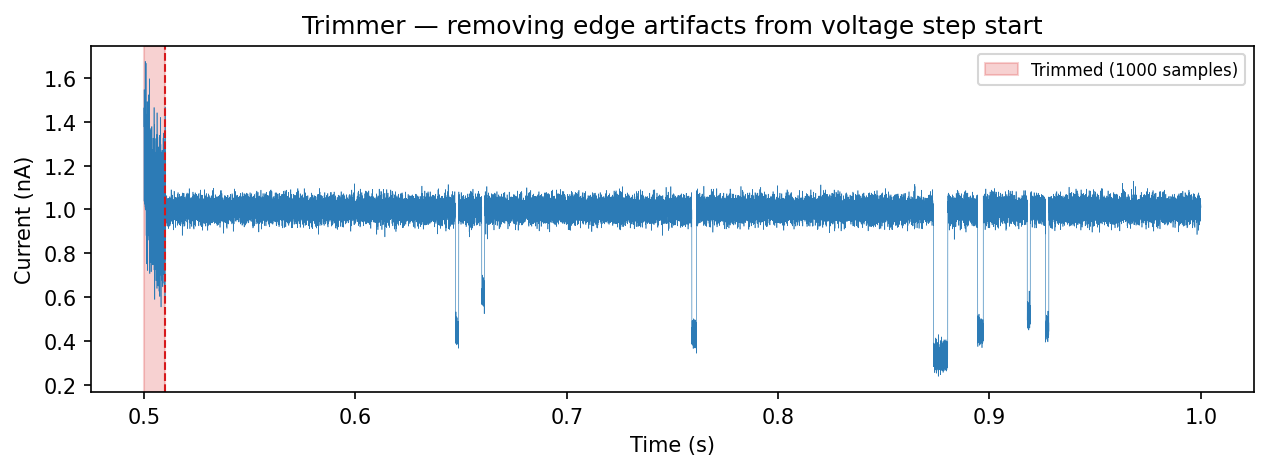
Voltage-step boundaries often contain transient artifacts — capacitive
spikes, settling oscillations, or amplifier saturation. Trimmer removes a
fixed number of samples from the start of each segment at a specified rank.
from ionique.utils import Trimmer

trimmer = Trimmer(
    samples_to_remove=500,  # discard first 500 samples of each vstep
    rank="vstep",           # operate at this rank
    newrank="vstepgap",     # children get this rank
)
trimmer(trace)
After trimming, each "vstep" segment gains a child at rank
"vstepgap" that excludes the leading samples. Downstream parsers should
target "vstepgap" instead of "vstep":
# Parse events within trimmed steps
trace.parse(parser, newrank="event", at_child_rank="vstepgap")
Parameters:
Parameter |
Default |
Description |
|---|---|---|
|
(required) |
Number of samples to discard from the start of each segment. |
|
|
Rank of segments to trim. |
|
|
Rank assigned to the trimmed child segments. |
Chaining preprocessors
Preprocessors are composable. A typical pipeline:
from ionique.utils import Filter, ClockFilter, Trimmer

# 1. Remove clock tone
ClockFilter(clock_frequency=1000, sampling_frequency=100000)(trace.current)

# 2. Lowpass filter
Filter(cutoff_frequency=5000, filter_type="lowpass",
       sampling_frequency=100000)(trace.current)

# 3. Trim voltage-step edges
Trimmer(samples_to_remove=300)(trace)
Order matters: remove narrowband interference (clock) before broadband filtering, and trim after filtering so the filter has context samples at segment boundaries.